I wrote this post in October 2026 and dated it to the 3.0 release of 8 October 2026.
Meta Kit is my SEO plugin for Kirby CMS. It gives editors one Panel area for all metadata, validates titles, descriptions and slugs against length ranges, and outputs meta tags, canonical, robots, Open Graph, Twitter Cards, hreflang and Schema.org JSON-LD from a single snippet, plus a sitemap and a dynamic robots.txt. AI generation is optional and follows the same ranges.
Why a major version
Version 3.0 is a major release because the Panel area was rebuilt. For a while the plugin carried a second area called “Meta Kit (Neu)” so that I could compare the old and the new design side by side. With 3.0 the new design is the only one; the old table, the stats cards and the suggestions dialog are gone. Content fields, blueprints and config keys are not touched, so for most installations the upgrade is a composer update and a look at the new area.
Breaking changes
The changelog lists four things that stop working:
- The
variant prop of the meta-kit-view component is gone.
- The old table and stats components are removed.
- The temporary “Meta Kit (Neu)” area and its
meta-kit-v2 route no longer exist.
- Custom CSS that targets
k-meta-kit-table or k-meta-kit-stats will not apply any more.
If you never touched the Panel components or their classes, this does not affect you.
The new Panel area
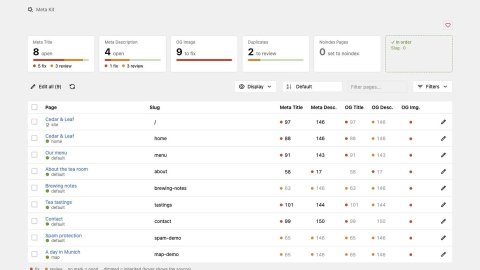
The area opens with one tile per topic: slug, meta title, meta description, OG image, duplicates and noindex pages. Each tile counts the open pages, split into fix (red) and review (orange). A click on a tile filters the table, a second click clears the filter.
The table shows less. Only problems get a dot, red to fix and orange to review; a value that is fine gets nothing. Inherited values are dimmed, and an Inherited switch hides them, keeps them dimmed, or writes the source beneath them. Hovering a value shows the full text, a length meter and where the value comes from. The edit and generate dialogs use the same style, with a length meter under every field, and the whole area works in dark mode. Two fixes came with it: readable dark mode colours and dialogs that no longer reappear when another dialog opens in Kirby 5.
What came with the 2.x releases of the same day
If you upgrade from 2.1.x you also get 2.1.6 to 2.3.0, released on the same day as 3.0. The short list:
- AI providers: Mistral and any OpenAI-compatible endpoint besides OpenRouter, support for reasoning models and custom OpenRouter model IDs.
- Generate Missing runs page by page with progress and cancel, and shows the texts for review before anything is saved.
- Duplicate meta titles and descriptions are detected.
- Redirects: after a slug change or a page move the old path answers with a 301 to the new URL.
- robots.txt can block AI training crawlers, and an optional llms.txt can be published.
- The sitemap is cached and lists page images.
- Social previews carry article tags, image alt texts and the site name.
- The Panel speaks German.
Among the fixes: JSON-LD is escaped so page content cannot close the script tag, and texts outside the validation ranges are no longer cut short.
Licence
Nothing changed here. Meta Kit is MIT licensed and free; the licence check for AI models went away with 2.0 in June 2026, and 3.0 adds no paywall or feature gate.
3.1 on the same day
Two more releases followed within hours. 3.1.0 moves view, inherited values and page size out of the toolbar into a Display menu. These settings are remembered per browser, while filters, search and sort are kept for the tab. 3.1.1 regroups the toolbar so that Display sits next to sort and the search next to Filters.
Upgrade notes
- Run
composer update tearoom1/kirby-meta-kit, or replace the folder site/plugins/meta-kit if you installed by hand. Meta Kit needs Kirby 5.
- Open the Meta Kit area once and check the tiles. Red counts are the ones to fix first.
- If you had custom Panel CSS for the old table or stats cards, remove it or rewrite it against the new area.
- If you linked to the
meta-kit-v2 route anywhere, drop it.
The code and the changelog are on GitHub, the package on Packagist. Bugs and suggestions go to GitHub Issues.