I wrote this post in October 2026 and dated it to the day both apps were back on Google Play. Gazania was approved on 3 October 2026, Gasamba on 5 October. I first released them in 2017, when I wanted my iTunes playlists on an Android phone without handing my library to a streaming service. They did their job for years, then Google’s requirements moved on and the listings went offline. This autumn I brought them back.
What Gazania does
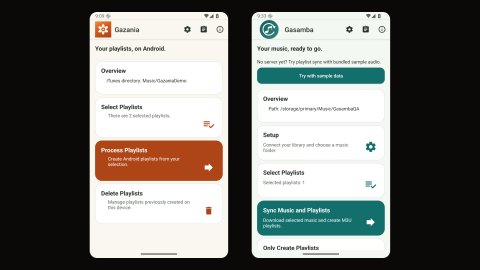
Gazania is for people who already have their music files on the phone and only miss the playlists. It reads the iTunes Music Library.xml that iTunes or Apple Music exports, matches the tracks to the audio files on the device and creates the selected playlists in Android’s media library, where any compatible music player can use them. Gazania does not copy or change audio files. You copy the music yourself, by USB, SD card or a sync tool.
Smart playlists work too, because the export already contains the tracks that the rules produced in iTunes. Tags in a playlist name can split it into decades, years, ratings or groupings, or sort it by date added, play count or rating. That part is unchanged since 2017 and is still the reason I use the app.
What Gasamba does
Gasamba also transfers the music. It connects to the folder your computer shares over SMB, reads the same XML file at the root of that share, downloads the music of the playlists you select into a folder you choose on the phone, and writes M3U playlists next to it. Nothing needs to be installed on the computer beyond the share. For a large library you can copy the files by USB first and let Gasamba do the later updates.
Gasamba needs SMB 2 or 3 on a trusted network or VPN. Version 3.0.4 adds an offline demo: tap “Try with sample data”, pick a folder, select the demo playlist and sync. It copies two bundled sample files locally, so you can see the whole flow before setting up a share.
How the apps relate
The free Gazania creates playlists when you start processing. Gazania+ is a separate paid app that adds scheduled background runs and processing after Android media scans. Both have no ads. Gasamba is the sibling for the transfer case, with a Gasamba+ listing for scheduled sync. Longer term I plan a one-time Plus unlock inside the free apps instead of separate paid listings, with existing buyers keeping what they paid for. That is a follow-up, not part of these releases.
What had to change after eight years
Google now expects apps to target a recent Android version, so both were rebuilt to target Android 16 (API 36) while still running on Android 8 or newer.
The bigger work was storage. In 2017 an app could read the XML from a file path and edit playlists freely. Under scoped storage that no longer holds. Gazania now opens the XML through the system file picker and keeps persistent read access to that one document. Changed playlists are recreated as playlist records, because removing members from audio owned by other apps silently failed. Audio access is a runtime permission, so the first launch asks for it. Testing against a real export turned up two smaller things: accented filenames used different Unicode forms on the Mac and on the phone, which is now normalised, and Apple Music exports may omit the “Music Folder” field, which used to abort the import.
Gasamba moved to the system folder picker for its destination, runs transfers as a foreground service with a progress notification, and drops SMB 1. Both apps got new privacy policies, Data safety declarations and an interface refresh with rounded cards and light and dark appearance following the system. Gazania+ also needed its target audience declaration saved again, which was what had taken the paid listing down in 2021.
Verification
Each release was tested as a signed build on Android 14 and Android 16 emulators: a synthetic import for Gazania, plus an unchanged real export with 2,107 entries, and a full SMB sync against a Samba fixture for Gasamba. Very large libraries are not covered by these tests, so if yours is one, start with a small playlist. The Play review of Gasamba took a few days longer than Gazania’s.
Where to get them
Setup steps, settings and the smart playlist tags are in the help sections of the Gazania and Gasamba pages. Questions go to apps@tearoom.one.