This post collects what changed in my Kirby plugins in October 2026: versions, dates, what changed, and what to check when upgrading. Meta Kit 3.0 of 8 October has its own post; here I only list what followed it.
Uniform Spam Words 1.9.0
Uniform Spam Words is a spam guard for Kirby Uniform that scores messages with weighted word lists and link counting. Version 1.9.0 of 22 October 2026 adds an optional AI check for messages close to the threshold.
In the default borderline mode, only messages whose score is within ai.margin (default 3) of spamThreshold are sent to a decision model on OpenRouter. The default model is Jev (typesafe/jev-1.14), which answers with a spam probability instead of text. If the probability is at least ai.threshold (default 0.8), the message is rejected; otherwise it passes. If the request fails, times out or no key is set, the word score decides as before; a failed request never rejects a message. Measured in October 2026, a checked message costs about 0.00002 USD and takes 0.3 to 0.5 seconds with Jev.
What to check: the AI check is off by default. To enable it, set ai.enabled, an OpenRouter key in ai.apiKey and a short description of the form in ai.context. Only the checked fields and the context are sent, never name or email, but the message itself can contain personal data and is processed by OpenRouter and the model provider, so mention this in your privacy policy first. If you switch ai.model, check ai.threshold again, because probabilities differ between models. The details are in the changelog.
Content Watch 3.7 to 3.12
Content Watch records who changed which content and when. Versions 3.7.0 to 3.12.0 were all released on 23 October 2026, so the changelog carries one summary for all of them.
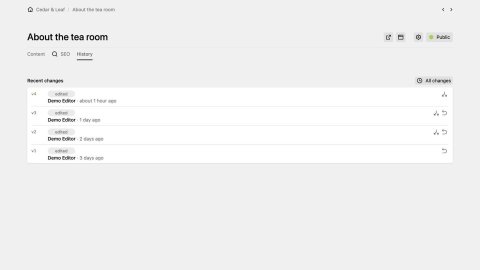
View: the area uses Kirby’s own view header with tabs for Content Changes and Locked Pages. A new timeline view next to the by-page view lists all changes across the site, newest first, grouped by day; changes made outside the Panel within a few minutes, form one expandable row. The new option defaultView takes page or timeline; the choice is remembered per user.
Diff: fields show their blueprint label instead of the raw key, and changed words are highlighted inside changed lines. Blocks, layouts and structures are compared entry by entry, references are shown as titles and names. Secret-looking values such as API keys and passwords are never shown, only “value changed (hidden)”. The dialog compares with the current version by default.
Restore: a version can be restored right from the diff dialog. Restore runs through Kirby’s own page actions as the current user, so permissions, blueprint validation, hooks and the page cache apply, and it adds a new history entry instead of rewriting the history.
Reliability: the history file is written with a lock and atomically; a corrupt file is moved aside instead of blocking the save. Changes without a Panel user are labelled “Outside the Panel”.
What to check: layoutStyle is deprecated and has no effect. Restore needs the Kirby permissions update, changeSlug, changeStatus and changeTemplate. A version that fails the current blueprint validation cannot be restored as a published page. In Kirby 5, a page with unsaved changes cannot be restored until they are saved or discarded.
FTP Backup 1.7.2 to 1.11.0
FTP Backup creates ZIP backups of the content and uploads them to an FTP, FTPS or SFTP server. 1.7.2 of 5 October names the endpoint and the cause when the connection fails. The releases of 20 October check every archive and every upload, notify by email or webhook when a run fails, warn in the Panel when the newest backup is too old, protect single backups from automatic deletion, encrypt archives with AES-256, back up extra folders such as site/accounts, and show local and server backups in one table. 1.10.0 to 1.10.2 of 23 October add the support link, fix additional paths when the Kirby root is behind a symlink, and update phpseclib to 3.0.57 for its security advisories.
1.11.0 of 23 October rebuilds the Panel area as a native Kirby view. Three tiles show the last backup, which turns orange when it is older than maxBackupAge, the backups on the web server and those on the FTP server. The table says where each backup lives, with unambiguous dates, and notes which copy the next run will delete. Backups that only exist on the server can now be downloaded or copied back to the web server. The Panel no longer connects to the server on every visit: the listing is cached for 15 minutes and refreshed after a backup or when you click refresh.
What to check: the new option serverCacheMinutes (default 15, 0 turns the cache off). A backup copied back to the web server falls under the local retention rule again, so protect it if you want to keep it. Backup dates now come from the timestamp in the filename instead of the file time. If you wrote your own FTP client, it needs the new download() method. The details are in the changelog.
Meta Kit 3.1.2 to 3.4.0
Meta Kit got five small releases after 3.0. 3.1.2 of 11 October keeps the overview cards together on desktop. 3.2.0 and 3.3.0 of 22 October redirect /sitemap to /sitemap.xml, render stored meta values in full, leave unreachable parents out of the JSON-LD breadcrumb and flush the sitemap cache only on content changes. 3.3.1 never outputs the current time as the modified date. 3.4.0 of 23 October opens the central support page from the Panel. None of them changes config keys or content fields.
Support page and Supporter License
The plugins are free and MIT licensed, and they stay that way. New this month is one support page for all of them. Paying is voluntary and any amount is fine. The money pays for the time I spend on updates for new Kirby versions, bug fixes and answers to issues.
Agencies and companies that need an invoice can get a Supporter License. You choose the price and whether it covers one project or your whole company. The sale runs through Lemon Squeezy as merchant of record, which also handles VAT. The license is a thank-you, not a contract: it adds no features, no priority support and no guaranteed response times. The support links in the Panel areas of Content Watch 3.7.0 and Meta Kit 3.4.0 open this page.